首先进入ras-shell;
ras-shell(winvps.com) > rebuild
You choose 32 bits.
OS List:
0 : Windows 2003 Server Chinese Version
1 : Windows 2003 Server English Version
选0
Type the number of the OS: 0
You choose Windows 2003 Server Chinese Version
Rebuild the VPS will destroy all your data. Are you sure you want to destroy all the data and rebuild the VPS? (TRUE/FALSE) :
打TRUE,确认安装,原数据就都没了。
经过一些*号的提示后,就显示安装成功了!
The network info: {\’netmask\’: \’255.255.255.224\’, \’ip\’: \’74.82.169.xxx\’, \’dns2\’: \’208.67.220.220\’, \’dns1\’: \’8.8.8.8\’, \’gateway\’: \’74.82.169.65\’}
The Windows administrator password is rashost.com
The VPS is not Linux
Please use vncviewer to connect to x100.rashost.com::端口
The VNC password is xxxxxx
For more infomation about vncviewer, see http://rashost.com/blog/vnc-windows-vps-console
Using config file \”/home/xen/winvps.com/winvps.com.cfg\”.
Started domain winvps.com (id=758)
Command finished.
用终端mstsc连,连不上
ras-shell(winvps.com) > list
Error: Domain \’winvps.com\’ does not exist.
可能是没启动
ras-shell(winvps.com) > start
Using config file \”/home/xen/winvps.com/winvps.com.cfg\”.
Started domain winvps.com (id=759)
启动后
ras-shell(winvps.com) > list
Name ID Mem VCPUs State Time(s)
winvps.com 759 256 1 —— 4.8
再过会儿,应该就正常了
ras-shell(winvps.com) > list
Name ID Mem VCPUs State Time(s)
winvps.com 759 256 1 -b—- 8.3
但还是连不上。
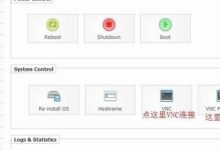
只好用VNC进入试试,下载了rashost上推荐的TightVNC Viewer,连上。以为没开启远程桌面,实际上已开启。研究了一段时间后,发现IP不对,于是按安装成功后给出的信息,设定了VPS的IP、网关和DNS。
终端就可以连了:)
就是只有一个C盘,之前买的时候有C\\D盘的,可能是以前人留下的吧。测试了一下asp是否能用,简单的在web扩展中启用了asp,测试成功!
附:
ras-shell使用手册 http://rashost.com/blog/ras-shell-manual